
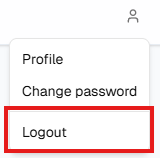
While signed in, open the person icon menu (desktop) and choose Logout. On a phone, open ☰ and choose Logout at the bottom of the panel (below Profile and Change password). Top bar & menus has more screenshots of these menus.
What to know
- Logout ends your session and returns you to the public home page.
- Always use it on shared PCs, kiosks, or classroom machines, and before you hand your device to someone else.
- Closing a tab is not the same as signing off—use Logout when you need a clean exit. If it fails, try again or close the browser; on a shared PC, contact IT if you remain signed in.